
For MSPs
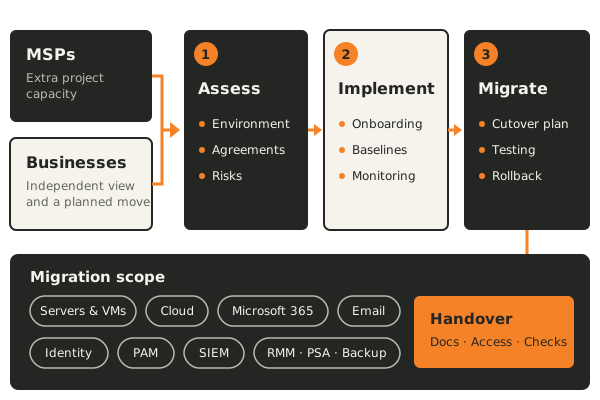
Take on assessments, client onboarding and migration projects without stretching your team. We can work under your brand or alongside your engineers, following your tools and processes.
We work with managed service providers and the businesses they support. We assess environments, implement agreed projects and migrate servers, cloud workloads, Microsoft 365, identity and security tooling.
Take on assessments, client onboarding and migration projects without stretching your team. We can work under your brand or alongside your engineers, following your tools and processes.
Get an independent view of your environment and the service you receive, set up a new managed service, or move to a new provider or back in house with a planned handover.
Responsibilities between your team, the MSP and us are agreed at the start, so nobody is unsure who owns each change.
Document servers, cloud accounts, Microsoft 365, identity, backups and security tooling. Record the risks and priorities so the next steps are clear.
Compare the service you receive with your agreement, including response times, patching, backups, documentation and who holds administrative access.
Bring a new client or site into a consistent setup, with access, monitoring, backups, security baselines and documentation in place.
Move workloads between servers, hypervisors, data centers and cloud providers, with tested cutover and rollback steps.
Move mailboxes, files and tenants, with identity, licensing and DNS changes planned around the cutover.
Move or set up identity providers, privileged access management and security monitoring, so sign in, administrator access and alerts keep working through the change.
Plan changes to RMM, PSA, backup and endpoint security tools, including agent rollout, data export and a period of running old and new side by side.
Document the current environment, agreements, access and dependencies, and agree what a good result looks like.
Agree scope, who does what between your team, the MSP and us, the cutover approach and the rollback steps.
Carry out the work in planned stages, test each system and tell users what will change before it reaches them.
Update the documentation, transfer access and confirm monitoring and backups work for whoever runs the environment next.
The current environment, its risks and priorities, with a recommended plan.
Scope, responsibilities, cutover schedule, testing and rollback steps.
Updated documentation, access records and the checks completed at handover.
The exact deliverables and responsibilities are agreed before work begins.
Not unless that is what you want. We often work alongside an existing MSP, and the responsibilities between us are agreed at the start.
Yes, where agreed. We can work as part of your delivery team, follow your processes and tools, and keep client communication the way you prefer.
Yes. We plan the transition so access, documentation, monitoring and backups move with the environment, without gaps in between.
Servers and virtual machines, cloud workloads, Microsoft 365 and email, identity providers, privileged access management, SIEM, and MSP tools such as RMM, PSA and backup platforms. The scope is agreed for each project.
Some changes, such as a new sign in or mailbox, are visible. We plan the timing and tell users what to expect, so the change is not a surprise.
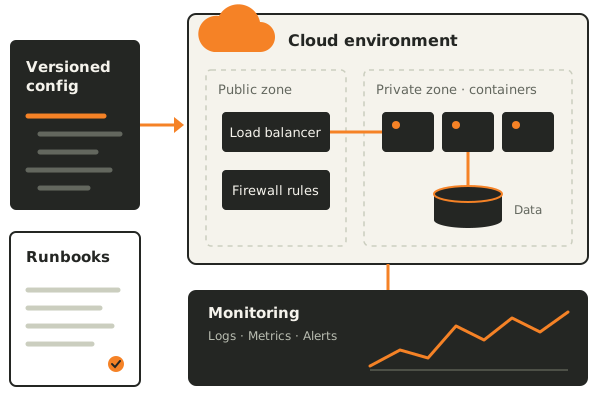
Your infrastructure should make work easier. We help you plan cloud environments, automate the repetitive parts and understand what needs attention.
Explore this service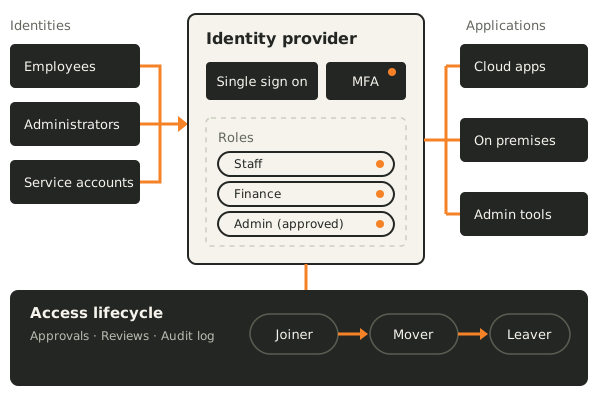
Bring structure to user identities, application access and service accounts across cloud and on premises systems.
Explore this service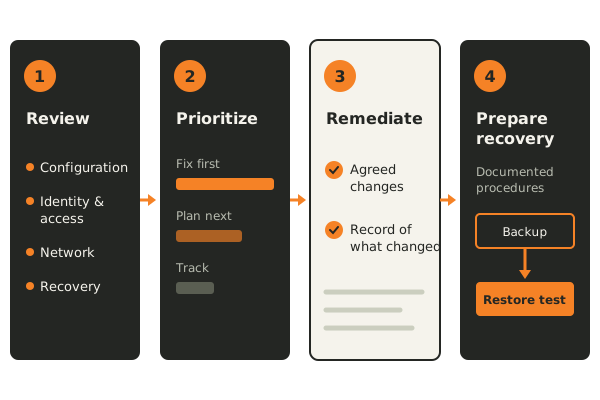
Security is easier to act on when the priorities are clear. We help review your environment and turn the findings into manageable work.
Explore this serviceStart with your current setup and what needs to change.